


4 Essential Tips About How To Use Youtube For Your Business
Youtube is a powerful social media although many companies avoid using it for several reasons. For the 18-34 age range this is the most used cable network. People spend their time to watch every month 6 billion hours of video. This score increases by 50% in one year according to the study of Mushroom Network. So Youtube offers many opportunities for your business that you need to know how to optimize it.
1. Target your audience
The statistics above show that you can reach a large part of customers as it is the second most popular search engine in the world. But even if you can reach all kind of audience, you can get easily lost. First you must analyze the habits of your potential customers: which kind of videos did they watch? We can distinguish clearly two types: educational (How to…, documentaries) or entertainment (humoristic videos…).

Extract of the top result Youtube search bar
2. Succeed in conversion
A video is much more efficient to spread the word than a text. So you have to clearly establish a strategy. Your video must show a message and the values of your company. People now tend to prefer watching videos than reading texts. It is easier for the clients to be concentrated and to understand things when it is a video.
3. Don’t neglect SEO
SEO strategy is also really relevant to use on Youtube. The principle reminds the same as in other social media. You need to find relevant keyword tags linked to your business. Moreover, the title of your video must be relevant and easy to find for the user. Your description should also use as many keywords as possible. One of the main metrics for Youtube is the number of time users spend on a video. Your viewers should not only open your video and closed it immediately, you must try that they remind here. Do not ignore your engagement with the users. It is important that users also comment, like or share your videos. Do not forget to add a CTA to your website. It is a link that you insert on your video under a graphic form (it can be a button, a banner…).
4. Manage your Youtube channel with tools
Many companies think they need too many budgets and capabilities to open a Youtube Channel. In fact it is more easy to use than it looks. With new smartphones you can shoot good quality videos without professional equipment. Many software like Vyond will help you to edit your video. You can manage this social media thanks to Hootsuite which will also provide you statistics. The topics of your video can at the beginning be quite simple such as presenting your business, your product and how to use it…
These tips show you how important it is for your business to use Youtube and how to use it.


6 reasons to integrate Pinterest to your social media strategy ?
For those who don’t know Pinterest, it can be summarized as a social network that allows you to pin inspiring ideas and images in a board.
This easy and simple social media can have a huge impact on your business.
Whether you are an entrepreneur, a craftsman or a head of a company, it is essential to choose the right social media to communicate. Many choose Facebook, Instagram or Twitter while other social media may be more relevant and effective. Pinterest, often set aside, can be the right choice to make.
Here are 6 reasons why you should integrate Pinterest in your social media strategy.
1- A great way to highlight your products
Pinterest’s concept is to pin images. If your aiming to show your products or services, this is a social media made for you!
As the links to your products or services are displayed as images, you can highlight your products very easily and in an aesthetic way. Whether you are a sports coach, a designer, architect, or any other profession that can be highlighted visually, it may be interesting for you to use Pinterest. Even if your are working in B2B , you can also use it by putting your services via infographics for example.
This platform can also be a productive method to initiate brand performance. You can show and teach your customers how to use your products or services. Often written or video instruction manual are boring and everybody ignore them. Pinterest offers you the opportunity to provide product training in an enjoyable and educational way that your customers will appreciate to see.
2. Improves your SEO & drives traffic
On Pinterest, each pin has a title and a description. To optimize this, you can insert hashtags, inspired by the keywords offered by the social media.
So this improves the chances for your images to be found by your target audience. Especially since Pinterest is based on sharing content, your pin has a longer lifespan than a message on other social media like Twitter or Facebook.
With each new pin, you get a link to your website. Thanks to these backlinks, your website receives organic traffic, which leads to a better referencing on search engines. Eventually, these pins will continue to generate traffic on your website automatically and thus increase your leads and sales.
3. Pinterest users are willing to buy your products
Users are coming on Pinterest in order to find inspiration, ideas and discover new products, new brands thanks to promoted pins. So they are already in a purchasing perspective.
Thanks to the “shop the look” feature, you can indicate exactly where the product is in the image. A point is then displayed, which allows users to either be redirected to the product page on your website, or then directly to buy via Pinterest. It’s a really efficient shopping feature to increase your sales.
4. Stay up to date about your competitors
Thanks to its various features, Pinterest is also a great curation tool. Once you have created your account, you can subscribe to other users' accounts. Then can see their images pinned, and re-spin them to your own board. Using Pinterest for your business is therefore also a good way to perform competitive intelligence. In this way, you stay informed about your competitors and your expertise field’s latest trends.
You can invite your team members to join you on a collaborative board. This way, you can benefit from each other findings. If you want your work to be shared only with the users you choose, you can also choose a board in “secret mode”.
5. Stay up to date about your audience
You can see your competitors but also your followers, and so discover what they like.
Pinterest is a good social media to explore latest trends, to find what users share and use this information to rank your products.. To know more about your followers and what influence them, you can simply follow them.
6. Time saving
One of Pinterest biggest advantage, is that all your actions can be automated. From pins to board creation, everything can be done automatic thanks to 2 plugins, really easy to use, called Tailwind and Boardbooster. They can help you save your time if you’re aiming to develop your activity on this social media.
That are 6 good reasons for using Pinterest. This social media is not to be set aside. For some activities, this may even be the most relevant choice. It offers you the opportunity to boost your ROI, drive traffic, leads and sales.

Design The Perfect Call To Action
Have you already seen a button at the end of an article or of a website page saying “subscribe here”? It is used to attract visitors to do a precise action: for example, subscribe to a newsletter, to an offer or a link towards a contact form. Some methods must be followed to convert a visitor into a prospect. Indeed this can be a good way to collect data about potential customers.
1. Find the good format
It can be a button or a banner with texts on it… You have multiple choices, but you must think what is the most relevant for your audience. You should ask the question: Would it be more catchy if you put this banner at this place? You should not put too many CTA so visitors do not get lost. It must not be also too big so that it does not seem aggressive.
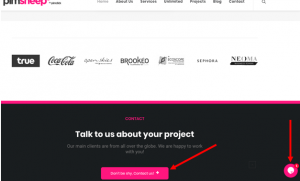
For example on the Pimsheep landing page, you can see two different types of CTA : a fixed one in the middle and an animated button on one side.
2. Find the position of your CTA
Your CTA can be static or on the contrary animated. It can be a static bar that is rooted on the website or an animated one that appears on the side of your page. The purpose is to catch the attention of your visitors. You can also animate your CTA, for example once you click on the Pimclick button, a chatbot appeared so the visitor can interact. It is important to adapt your CTAs to all your profile of audience. Also it must be available on mobile phone as today 60% of the traffic is on this device.
3. Text or image?
Studies show that the conversion rate is weaker for a CTA image than for a text or a button. It can be relevant if you want to show your product. You can add an animation so that the visitor understand that it is a CTA.
4. Personalize your Text
Your text can be totally explicit and clear for the user: “Click here”. Or, it can describe an action “try a Demo”, “Download here”.
It is important to conjugate your verb at the imperative form
If your CTA represents an occasional event such as sales, you can play on the urgency: “-50% until XX” or “Only two models left”.
You can also personalize your website depending on users’ location, the gender or following the way your audience enter the page.
Another idea is to create a catchy sentence that will surprise and attract the curiosity of your visitor.
These tips can help you to design the best CTA, you just have to add a bit of your imagination now.